

Change it while it is cheap
Moving a button in a design is a quick edit. Moving it after the app is built is a change order.
Services · Apps and AI
New serviceWe plan the screens and the path between them, then hand you a prototype you can tap through and a design file a developer can build from. It is the cheapest point in a project to change your mind.
The short version
What you get
Design only, with no code. You leave with something you can show to staff, customers, a partner or a developer.
Every task a person can do in the app, drawn as steps from the first screen to the last, so nothing is missing when the build starts.
Plain wireframes that settle what goes on each screen before any time is spent on how it looks.
Every screen designed in full, in your colors and type, for the phone or the browser it will run on.
The screens linked together so you can tap through the app, hand it to someone else and watch where they get stuck.
Empty lists, error messages, loading and the first time a person signs in, which are the screens that get forgotten.
The design file with colors, type, spacing and reusable parts named and organized, plus notes on how each screen behaves.
 Concept
An illustration, not client work
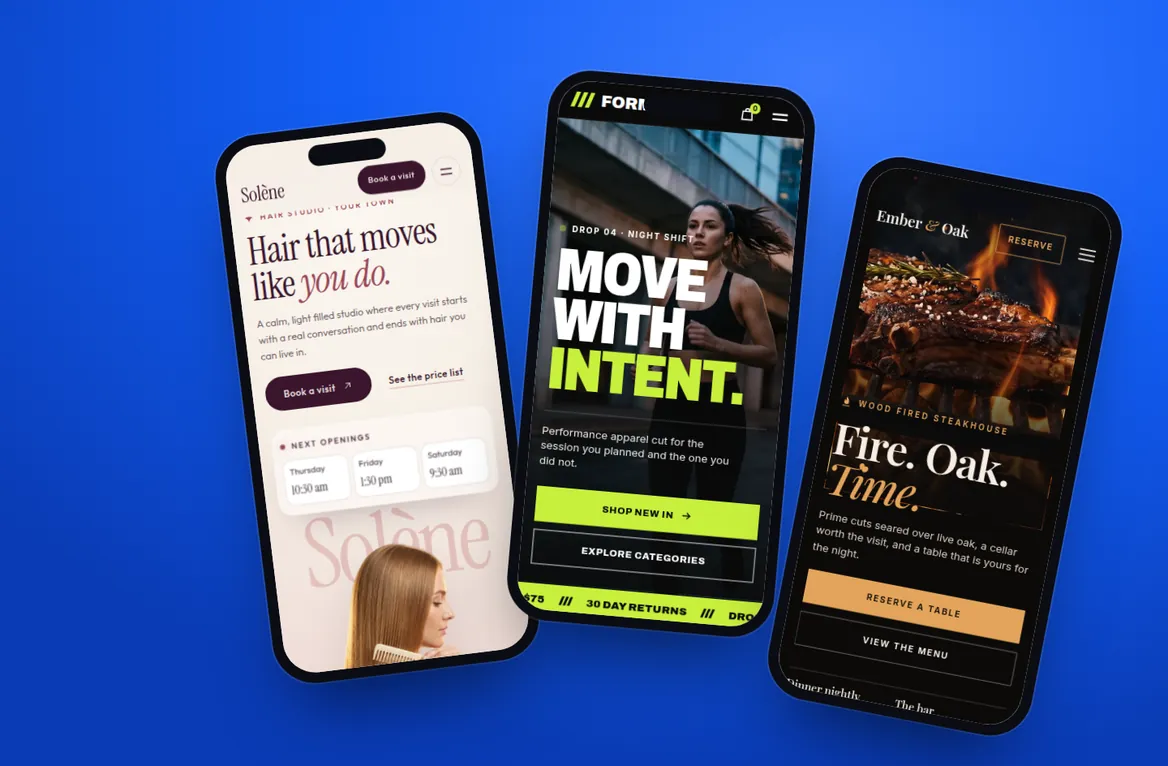
How we design for a phone.
The picture shows three of our concept sites on phones. Each is a website for a business we made up, so none of them is an app and none is client work. It is here because laying out a small screen with care is the same job an app design asks for.
See the concept sitesHow it works
Nothing is designed until the scope and the price are agreed in writing.
We ask who will use the app, what they are trying to get done and what they use today. From that we list the flows the design has to cover.
We map each flow and lay out the screens in plain boxes. You review them and we settle the structure before any polish.
We design the finished screens and link them into a prototype. You tap through it, share it and send back one round of changes at a time.
You receive the prototype link, the design file in your account and written notes. A developer, ours or yours, can start from there.
Pricing
Design is quoted on its own, so you can stop here or carry on.
How the price is set
The price depends on how many screens and flows the app has, whether it is for a phone, a browser or both, and whether a brand already exists or has to be created. After the call you receive a written scope that lists the flows we will design, the number of revision rounds, the files you receive and one price. If you go on to build with us, the design is already done and the build quote is for the build alone.
The design tool may charge for its own plan. If it does, that is billed to you directly.
Why it matters
Moving a button in a design is a quick edit. Moving it after the app is built is a change order.
A prototype ends the guessing. Staff, partners and developers all look at the same screens.
A developer can price finished screens far more closely than a description in an email.
The file is yours and follows common conventions, so you are not tied to us for the build.
A link to a clickable prototype, the design file with every screen and its reusable parts, and written notes on how the screens behave. The file sits in an account you own.
We quote it after a call. The price follows the number of screens and flows, the devices it must cover and whether we are working from an existing brand. You get one price in a written scope before any work starts.
Not yet. This is a new service, so we show no client app designs and make no claims about results. Our design work on the web, for clients and for concept businesses, is on the work page. See the work
Yes. That is the point of the handoff file. Colors, type, spacing and reusable parts are named and organized, and the notes explain behavior a picture cannot show.
Yes, as a separate project with its own quote. iPhone apps and web apps are both on our list, and both are new services for us. See iPhone apps or web apps and client portals
A description of who the app is for and what it must do, your logo and brand colors if you have them, any existing screens or sketches, and a person who can review and decide.
No. It is a set of linked pictures that behaves like an app when you tap it. It is for testing the idea and guiding the build. It cannot store data, take payments or be put on the App Store.
Yes. We can redesign the screens of an existing app or tool and hand the file to whoever maintains it. We will need access to the current version and a list of what is not working.
Tell us who it is for and what it should do. We will scope the design and put the price in writing.